Les guides produit sont disponibles dans la bêta du nouveau docs.box.com, repensé et assisté par l’IA. Découvrez tous les détails sur les changements.

Box Drive for Parallels desktop

New post

Commentaires

19 commentaires

  • Aira

    Hi there, 

    Welcome to the Box Community!

    This issue should be best addresses by our Product Support. I have created a ticket for you and kindly check your Inbox for updates.

    Thanks!

    0
    Actions pour les commentaires Permalien
  • Carora1

    hi - any updates on this? I am having the same issue and it tells me to run the 64 bit, but that app continues to fail

    0
    Actions pour les commentaires Permalien
  • Shann Bedford

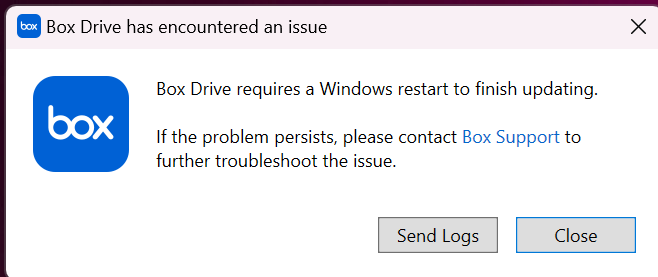
    Hi Aira, has there been any resolution for this.  I am trying to install Box Drive for Windows in a Parallels Windows 11 environment and keep getting an error that prompts me to reboot.  After reboot we get the same error.  I can see that the app installed but it won't launch and we don't get the Box Drive link in Windows Explorer.  Thank you for any assistance.

    Shann

    2
    Actions pour les commentaires Permalien
  • JAMIE M MCDOWELL

    I am having the same problem! No matter how many times I restart windows, or undownload and redownload box drive I get the same problem. Please help!

    0
    Actions pour les commentaires Permalien
  • Corey Summers

    Hello has Box commented on this issue yet?  I have the same issue on an M1 mac running windows 11 in parallels.

    0
    Actions pour les commentaires Permalien
  • Nick Portmann

    I have the same issue… any update 

    0
    Actions pour les commentaires Permalien
  • Ryan Stipan

    Not seeing any updates yet, I also am having this issue. Any one have any luck? Box works fine on my Mac, but keeps erroring out when in Windows via Parallels. 

    0
    Actions pour les commentaires Permalien
  • vickie fageol

    I am having the same issues - anyone find a fix for this?

    0
    Actions pour les commentaires Permalien
  • MOSTAFA AKBARI

    I am having the same issue, is this issue resolvable at all?


    1
    Actions pour les commentaires Permalien
  • Corey Summers

    I opened a ticket and followed all their insructions which was nothing more than uninstalling and reinstalling really and its still doesn't work.

    0
    Actions pour les commentaires Permalien
  • MOSTAFA AKBARI

    Just to let everyone know, for me "BOX SYNC" works, it takes time to sync to the box folder but it works, 

    -1
    Actions pour les commentaires Permalien
  • Colby Dolly

    Is there a solution to this yet?


    1
    Actions pour les commentaires Permalien
  • David Whittinghill

    I am also having this issue on a M3 Max MBP 2023, Sonoma 14.2.1.

    Parallels Version 19.2.1 (54832)

    I get the following error message. After restarting Windows (in Parallels), when I open Box Drive I get the same error message.

    1
    Actions pour les commentaires Permalien
  • Machine Op

    I am running into this same error.  I am having all sorts of issues getting box drive on a users parallels (sonoma) / macbook pro (w11).  I did use the MS troubleshooter with little success.  Hope there is fix for this in the near future.  


    0
    Actions pour les commentaires Permalien
  • Nick Portmann

    I got round this by installing on the Mac and then mapping to Parallels Windows desktop. Hope this helps.

    1
    Actions pour les commentaires Permalien
  • Patrick Poncet

    Is there any word at all from Box' support as to whether Windows ARM support is considered in a parallel desktop environnement?

    0
    Actions pour les commentaires Permalien
  • Jeremy Mitchell

    same issue. 2023 mbp. box will not complete install on windows using parallels desktop. it wants to reboot and when it does throws another error. 

    0
    Actions pour les commentaires Permalien
  • Blake Disalvo

    I am having the same issue and need box on my computer by early next week

    0
    Actions pour les commentaires Permalien
  • Nick Portmann

    I got round this by installing on the Mac and then mapping to Parallels Windows desktop. Hope this helps

    0
    Actions pour les commentaires Permalien

Vous devez vous connecter pour laisser un commentaire.