Microsoft Word file opened from box doesnt have autosave on
Answered
Please see screenshot below. I installed BoxToolsInstaller.exe. But when I click on the first icon, the word document is opened with autosave off. I do not see what the other people are doing. I need to save and stuff does get saved on the cloud. But this is not ideal, it should behave as Teams/Sharepoints behaves; you open it with Desktop App and everyone can coedit and everyone see where people are and write in real time. Is this feature available? If not, when will it be?
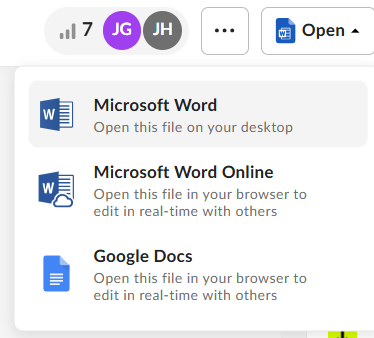
-

Hi Alberto,
Welcome to Box Community.
We have a feature called "Box for Microsoft Office co-authoring" - this enables autosaving edits and real-time collaboration for Office files stored in Box. You can simultaneously edit and collaborate on Microsoft Excel, Word, and PowerPoint files on the Office desktop applications in real-time, with all changes automatically saved to your Box account.
However, ‘Box for Microsoft Office (desktop co-authoring)’ is only available to Box Enterprise.
I trust this provides the information you were looking for. Thanks for posting!
Best,
Ann -

 Hi Ann,
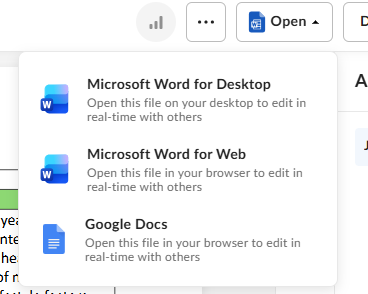
 My workplace has Box Enterprise but when colleagues work on shared word documents, opening them in Microsoft word for desktop, which the description on the drop down says "open this file on your desktop to edit in real time with others", it opens in word with autosave off and we're unable to work in the file at the same time - I'd say it's the same issue raised in the original comment. I haven't been able to find a plug in or how exactly to check whether we are using the Box for MO co authoring, but from the description it would seem like it's an inbuilt automatic feature that should work when opening in word on desktop?
Any help resolving this issue would be greatly appreciated as this has been a really off putting initial start to using Box for our team!

Please sign in to leave a comment.
Comments
3 comments