データ移行中のエラー
Answered
添付画像のようなエラーメッセージが出ます。ストレージ無制限のはずでは?ちなみにフォルダの中のファイルだけ移行しようとしても同じエラーメッセージが出ます。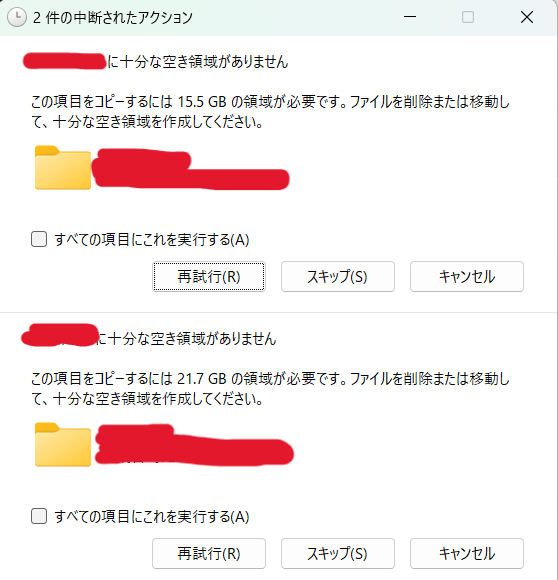
-

Thanks for sharing this type of info it's great to us.
-

Hi there,
Welcome to the Box Community, I'm happy to help!
Please be informed that this community is primarily intended for English language speakers. If you are able to post your question in English, the community may be better able to assist. Google Translate or other tools may help! If any community members are able to understand and help, it would be greatly appreciated.
Thanks for posting!
-

It looks like the error might not actually be related to storage limits, but rather permissions, file size restrictions, or a temporary issue during the migration process. You could try checking access rights or splitting the data into smaller batches to see if that resolves it. I ran into a similar issue before, and following some troubleshooting steps from this website helped me identify what was causing the transfer to fail.
-

This type of error usually appears even when storage is shown as “unlimited” because there may still be hidden limitations such as file count limits, sync restrictions, or account-level policies applied by the service. If you’re getting the same message even when only moving files from a folder, it could also be related to a sync/cache issue or a temporary system glitch. I would suggest logging out and logging back in first, then clearing the app/browser cache and trying again. If the issue continues, checking the exact error screenshot with the platform’s support team would help identify the root cause more quickly. I’ve also seen similar storage sync issues handled differently depending on the tool being used (for example, systems like tmsim may behave differently depending on configuration).
-
This error may not actually be related to storage limits. In many cases, it happens because of file permission issues, unsupported file types, or temporary sync problems during the migration process. I had a similar issue before, and moving the files in smaller batches helped fix it.
You could also try checking guides on Dubaiweb since they sometimes share useful troubleshooting tips for migration and web-related errors like this.
-
This type of error usually happens during data migration when the system cannot properly process certain files or folders, even if storage is unlimited. It’s possible that the issue is related to file permissions, corrupted files, or a sync limitation rather than storage capacity itself. I’d recommend trying to move a smaller batch of files first and checking whether any specific file is causing the problem.
-

Data migration errors can be a headache, especially when transferring large installation folders, data files, or OBB storage back and forth. Whether you are moving cloud files or setting up performance assets for custom Android apps, file corruption during the sync process can ruin the setup. Hope the support team provides a fix for this migration bug soon
-

データ移行エラーは、権限設定やファイル構造の不一致が原因になることも多いですね。以前、似たようなケースを調査した際のメモを gtasahub.com にまとめていますが、ログを詳しく確認すると原因の特定が早くなるかもしれません。
Please sign in to leave a comment.
Comments
8 comments